September 19, 2026
Bring the Studio Conners Video Desk to life
Can we make the Video Desk real enough to use it?
What came of the day
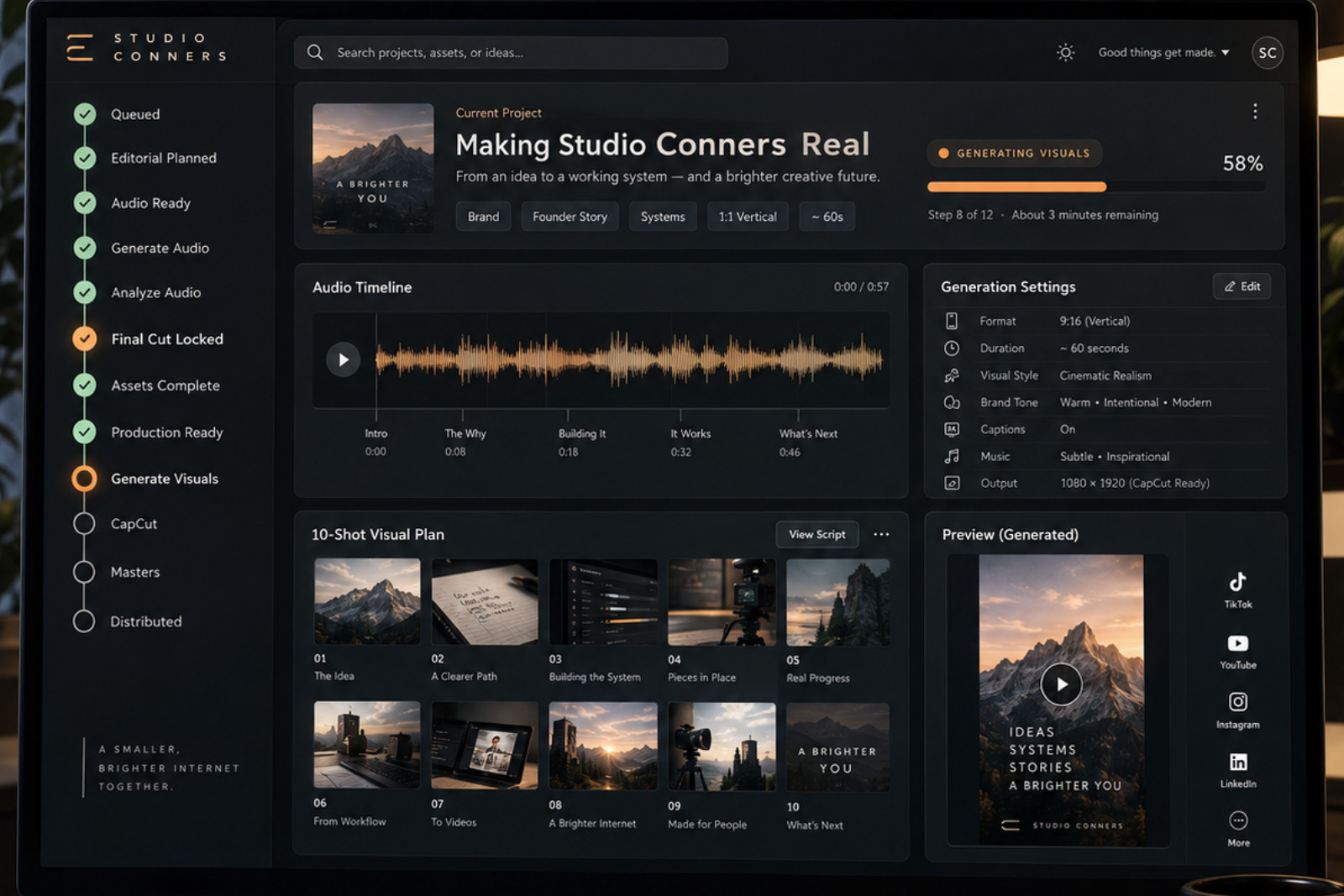
The Studio Conners Video Desk became a real production system rather than a planning concept. We moved the first real video, “Making Studio Conners Real,” through editorial planning, generated and analyzed its soundtrack, locked the final cut, prepared and bound all required assets, created exact shot-by-shot generation specifications and CapCut instructions, and advanced it to Production Ready. We then built the Generate Visuals stage, added reusable ComfyUI workflow templates, and proved that Video Desk can produce a shot-specific populated ComfyUI workflow instead of relying on chat history or manual re-entry. Shot 1 was successfully generated from that handoff. The test also exposed an important production constraint: our current 720p HunyuanVideo workflow takes roughly 2.5 hours for a five-second clip on the local machine, so the next production decision is to test substantially faster generation methods—beginning with HunyuanVideo 1.5 480p step-distilled—before committing to the remaining shots.
The story
We started with a queued Studio Conners work item and the question of whether the Video Desk could become real enough to carry an actual video all the way through production without depending on scattered chat history. Over the course of the day, that happened. The project moved through editorial planning, soundtrack generation, audio analysis, final cut locking, asset preparation, exact shot specifications, and CapCut instructions until it reached Production Ready. We then built the missing bridge into visual production: Video Desk can now hold a real ComfyUI workflow template and generate a populated, shot-specific workflow file from the locked production record. The first shot became the proof. Its source image, prompt, timing, frame count, seed, model settings, and output expectations were all carried into ComfyUI from the Video Desk, and the clip successfully rendered. But the render also exposed the next problem clearly: roughly five seconds of 720p HunyuanVideo footage took about two and a half hours on the local machine. The system worked, but the production economics did not. That changed the question from “Can Video Desk drive ComfyUI?” to “How much generative video do we actually need?” The answer may be much less than we assumed. Real artifacts, screen recordings, typography, deterministic CapCut motion, and music can carry most of a Studio Conners story, with generated video reserved for the moments where it adds something important. It also raised the possibility that 15 seconds may be a better default than 30. So the day ended with both a success and a useful constraint. The Video Desk crossed the line from documentation into a working production system, and the first end-to-end visual handoff was proven. At the same time, we learned that routine Studio Conners video cannot depend on slow local 720p generation. The next step is not to rebuild the system, but to make execution cheaper and faster—starting with a 480p step-distilled Hunyuan workflow and a more selective use of generated motion.
Discoveries
Video Desk can become the canonical production record
The first real specimen proved that the important creative decisions can live durably in Video Desk instead of being reconstructed from ChatGPT conversations. Audio selection, timing, shot intent, source assets, generation settings, CapCut instructions, candidates, and provenance can all belong to one production record.
Generated audio has to come before the final cut
The soundtrack was not just decoration added after editing. Once the actual generated music was analyzed, its transitions and payoff points materially shaped the locked timeline. Audio Ready and Production Ready are meaningfully different gates.
ComfyUI should receive decisions, not require them
A production-ready shot should arrive at ComfyUI with its prompt, negative prompt, dimensions, frame count, seed, sampler settings, expected filename, and source image already decided. Generating a populated workflow JSON from Video Desk substantially reduces manual reconstruction and makes ComfyUI an execution environment.
Workflow templates need exact provenance
A reusable ComfyUI workflow is more than a model name. The exact source JSON, checksum, node mapping, model files, disabled branches, and parameter semantics matter. Small differences—such as which SaveVideo field actually controls H.264—can make an apparently correct automated handoff wrong.
Local 720p AI video is too expensive in time for routine production
Shot 1 successfully generated and looked usable, but approximately five seconds of HunyuanVideo 1.5 720p footage took about 2.5 hours locally. At that rate, an AI-generated clip for every shot would make routine Studio Conners video production impractical even though the software itself is free.
The fastest production system may use much less generated video
An engaging Studio Conners video does not necessarily require every artifact to become an AI-generated moving shot. Real screenshots, documents, screen recordings, deterministic CapCut motion, typography, music, and perhaps one generated hero shot could carry the story much more cheaply and quickly.
Fifteen seconds may be a better default than thirty
The experiment raised a strong possibility that 15 seconds should be the normal Studio Conners vertical format, with 30 seconds reserved for stories that genuinely need it. Shorter videos reduce generation, editing, review, and distribution effort while still allowing a complete idea → evidence → payoff structure.
A faster Hunyuan workflow may preserve the system without preserving the bottleneck
HunyuanVideo 1.5 480p I2V step-distilled appears promising because it keeps the same general image-to-video production model while substantially reducing resolution and inference steps. Testing it is a more conservative next move than abandoning ComfyUI or the Video Desk generation-spec architecture entirely.
Results
First Video Desk Project Reached Production Ready
The real “Making Studio Conners Real” work entry was carried through editorial planning, soundtrack generation and analysis, final cut locking, asset preparation, shot specifications, and CapCut planning until the project satisfied the Production Ready gate. Attach/link: No separate file needed. If ObsessOS allows a link, use the Video Desk project itself.
Locked 30-Second Production Plan
A complete ten-shot timeline was locked against the selected soundtrack, with exact cut boundaries, visual intent, source assets, typography, and editorial purpose for every shot. Attach/link: Nothing required unless you want to preserve a production-plan export later.
Exact Visual Generation Specifications
Every AI-generated shot now has a durable generation specification including workflow, model files, prompt, negative prompt, dimensions, frame count, seed, sampler, scheduler, CFG, model shift, codec, and expected filename.
studioconners.com/office/videoReusable Populated ComfyUI Workflow Export
Video Desk can now store an exact reusable ComfyUI workflow template and produce a populated workflow JSON for an individual shot using the locked Production Ready specification, eliminating most manual parameter re-entry.
CapCut Assembly Plan
The project now contains deterministic final-assembly instructions covering shot order and timing, exact typography overlays, soundtrack placement, transitions, mix, export settings, and canonical master filenames.
First Video Desk–Driven Generated Shot
Shot 1 was successfully generated from the Video Desk production specification using HunyuanVideo 1.5 image-to-video. The resulting 720×1280, 24 fps, 121-frame clip provides the first proof that a Video Desk record can drive an actual visual-production result.
Open the file
Open threads
- est HunyuanVideo 1.5 480p I2V step-distilled and determine whether it is fast enough for routine Studio Conners production.
- Decide whether 15 seconds should become the default Studio Conners vertical-video length, with 30 seconds used only when the story needs it.
- Decide how much of a typical video should rely on real artifacts, screen recordings, CapCut motion, and typography versus AI-generated video.
- Determine whether local ComfyUI remains the normal execution environment or whether cloud GPU / hosted generation should become part of the Video Desk workflow.
- Finish “Making Studio Conners Real” through accepted visuals, CapCut assembly, the three canonical masters, and distribution.
- Decide whether Video Desk should eventually support multiple visual execution providers while keeping the same locked production record and provenance model.